![[Definitive guide] gulp, webpack, parcel... Understand the characteristics of the ever-growing list of task runners and choose the best one](/_astro/cover.BG9C7f0A_Z21CsoO.avif)
In recent years, frontend development has come to depend on tons of libraries and frameworks, and the task runners that manage them are likewise in a crowded field. The aim of this article is to lightly touch on their characteristics and concepts to make the differences easier to picture. I’ll only briefly cite reference articles for knowledge of Node.js or detailed instructions on actual environment setup. * Grunt, Bower, and Browserify can’t quite escape the feeling of being obsolete as some kind of inferior compatibility layer, so they don’t make an appearance in this article.
Prerequisite knowledge
Let me briefly explain the background. It’s a tangent from the main topic, so feel free to skip it.
What is a task runner anyway?
When you want to build a web page or web app, at the bare minimum you can just write HTML, CSS, and JavaScript. But in recent years, it has become the norm to develop using things like the following:
- Template engines like EJS, pug, or HAML You can write HTML more concisely, use shared layouts and parts, or mass-produce pages from JSON files.
- CSS preprocessors like SASS or PostCSS You can write CSS more readably and use variables and functions. You can also adopt features early that will be added to standard CSS in the future.
- JavaScript transpilers like Babel or TypeScript You can define types under stricter rules or write in a syntax that’s already been decided to be adopted in the future. Some, like CoffeeScript, exist mainly to simplify writing.
- Frameworks like React, Vue, or Angular There are tons of libraries with various purposes, used for SPA development and other rich frontend UI implementations.
- Module bundlers like CommonJS or AMD They treat JavaScript split into multiple files as Modules and combine them into a single file. Rather than just concatenating files in order, they resolve dependencies of functions and variable values to bundle them into one.
- Syntax checkers like eslint or stylelint Tools that verify CSS or JavaScript for syntax errors. You can also configure detailed coding rules.
And so on. There are tons of libraries and tools for writing HTML and CSS more conveniently and richly, and these days, writing HTML and CSS plain rarely happens. Also, when doing web development:
- A local server that lets you check the page you’re building on your phone in real time, and that auto-reloads every time you edit a file
- Plugins that compress images, or automatically generate images for CSS sprites
Convenient development environments like these are often introduced. The tools and libraries above can of course be installed and used individually. But running them one-by-one and managing each HTML, CSS, or image file manually is unrealistic. Also, the configuration differs for each project, and it would be nonsense for every co-developer to have to grasp all of that themselves.
That’s where a task runner comes in—it manages each of these as a task in a unified way, and once running in the background, it handles each file automatically. By using a shared config file, the entire team can quickly set up the same environment and perform the same operations without having to think much about it.
Frontend hell
As you may have noticed reading this far, the world of frontend development has gradually accumulated countless libraries, frameworks, transpilers, and dev environments, and they’re all reasonably popular—there’s no “if you just learn this, you’re set.” New things appear at a brisk pace, and it’s a world of intense rise and fall. As you can see here, there’s no settled “do it this way,” so even after learning a fair amount, the suffering continues indefinitely. Conversely, you could also say it’s fun because there are many options and each has its strengths. Don’t try to learn everything at once—gradually get used to what you need.
Node.js and NPM
Most of the libraries and frameworks introduced above, along with the task runners that handle them, are developed in Node.js and published as packages. The official tool that lets you easily install and manage these packages is the Node Package Manager = NPM. (Like Ruby’s bundler or Python’s pip.) It’s no exaggeration to say that frontend development environment setup begins and ends with NPM. (NPM-compatible YARN is also popular, but I won’t explain it this time.) You can create a management file called package.json in each project folder and list the packages you use inside that file. You can use task runners without deep knowledge of node.js or npm, but please at least be aware that they’re built on these.
gulp
[Official site]
[GitHub]
Among the up-and-coming task runners, this one has a fairly long history. Task settings are defined in gulpfile.js. You define each task individually and combine them to do a variety of things. It has very high flexibility, with rich APIs for file management and recognition. It’s recommended for very basic, static web pages, or, conversely, for slightly unusual cases like mass-producing pages from JSON using a template engine like EJS. On the other hand, for managing JavaScript modules, this alone is fairly inconvenient. Incidentally, this blog is built with Gulp.
| good | Very high flexibility, with abundant references and plugins. |
|---|---|
| bad | Weak as a module bundler; performance is average |
Recommended articles
- Get started with Gulp without stumbling: from installation to compiling Sass - ICS MEDIA A clear summary of how to start with Gulp.
- Shorten your build time using the task automation tool “gulp” | Web Creator Box An older article, but it summarizes Gulp setup in a way that’s easy for designers to follow.
- gulp | NxWorld For slightly more advanced settings and operations, NxWorld’s articles on Gulp are extremely helpful.
npm script
[Official site]
[GitHub]
In fact, npm—Node.js’s package manager itself—can be used as a task runner on its own. You can define tasks by combining plugin execution commands inside the package.json config file, and run them with the $ npm run command. It’s surprisingly capable—you can even define tasks in external files—and with effort you can do quite a lot. Execution is often faster than relying on Gulp, etc. Since all task runners covered here depend on npm, this approach is the simplest.
| good | Uses only npm’s native features, leading to a simple setup. High build performance |
|---|---|
| bad | Weak as a module bundler. Lower flexibility and fewer references |
Recommended articles
- A summary of npm-scripts task execution that Node.js users should know - ICS MEDIA A short article, but a great overview.
- [Loose translation] Why I gave up Gulp and Grunt - Qiita
- The story of an old man worn out by Grunt/Gulp - MOL I feel like the trend of “let’s drop Gulp and Webpack and just go simple with NPM!” came from the two articles above. They might not be very relevant to people who have never touched Gulp or Webpack.
webpack
[Official site]
[GitHub]
It became very popular in recent years as a module bundler (and task runner) replacing Browserify. It performs various processing by combining plugins called loaders. Its basic purpose is to consolidate JavaScript files; it can bundle even CSS and images into a single file as JavaScript. While you can normally compile and compress SCSS or images, in such cases it’s better to use it in combination with Gulp. It’s often used in development with modern JS frameworks like React or Angular. Its drawbacks include configurations that tend to get cluttered and a relatively high barrier to entry.
| good | Very popular as a module bundler, with many references |
|---|---|
| bad | Configuration is somewhat difficult; weak at file operations |
Recommended articles
- Learn webpack 3 with the latest version - the popular bundling tool for JavaScript development - ICS MEDIA Another ICS article. I think it’s perfect as an introductory piece. ICS also introduces sample code combining TypeScript, Babel, and React or Vue, so it’s very helpful.
- Getting started with webpack 3 from Gulp - Qiita If you want to use it together with Gulp, the Qiita article above is well organized.
- Modular CSS with React: CSS-in-JS and CSS Modules | Programming | POSTD When managing pages with multiple Components like in React, you may want to define CSS for each Component (this is called CSS-in-JS). Whether to create style definitions in CSS files or write them inside JS, the article above is a good reference.
Rollup
[Official site] [GitHub] Builds are slightly slower than webpack, but a notable feature is that the minified output files become very small. For that reason, it’s often used when developing libraries and the like. The config file resembles webpack’s. As with other module bundlers, it’s weak as a task runner, so using it alone may be inconvenient.
| good | Output files are small, suited for building libraries |
|---|---|
| bad | Builds are a bit slow |
Recommended articles
- Rollup feels just right - Qiita
- Webpack and Rollup: the same but different – webpack – Medium (Japanese translation )
Fusebox
[Official site]
[GitHub]
A fairly new module bundler. It’s overwhelmingly faster than webpack and has a simple configuration, gaining popularity in some circles. (Though it has less momentum compared to the later-arriving Parcel…) It supports a local server and TypeScript by default, and the config file fuse.js can be written concisely. Like webpack, it can also handle CSS and image processing as a task runner, but it might be better to leave those to Gulp or npm script. References are still quite scarce, so you might struggle if you try to do anything special.
| good | Outperforms webpack in build performance and config simplicity |
|---|---|
| bad | Few references; reliability may be slightly lower |
Recommended articles
- FuseBox – the up-and-coming JavaScript module bundler – PSYENCE:MEDIA A great article overviewing Fusebox and comparing it with competitors.
- Simpler and faster than webpack! An ultra introduction to the latest module bundler “FuseBox” - WPJ
Parcel
[Official site] [GitHub] This is also a recently released task runner, but it’s growing in popularity thanks to its overwhelming ease and performance. Without preparing a complex config file like webpack’s, it senses things nicely and performs builds and bundling. A development server comes packaged from the start. While configuration is extremely easy, customization and features are still limited—my impression is that it’s still short on functionality for production use. If features expand in the future, it could replace webpack.
| good | Overwhelmingly outperforms webpack in build performance and config simplicity |
|---|---|
| bad | Few references; still under development with relatively few features |
Recommended articles
- The end of the webpack era and the beginning of the parcel era - Qiita The Qiita article that ignited Parcel’s popularity.
- No need for custom config files like webpack or Gulp. Compiling Sass and Autoprefixer with Parcel - Qiita
- Compiling and bundling TypeScript with config-file-free Parcel was so easy it was anticlimactic - Qiita
Honorable mentions
If configuring the task runners above is a hassle, another option is to use a boilerplate (template/development template) that comes with task runners pre-configured, or one bundled with a Web framework.
- Create React App A development environment for React provided by Facebook, the developers of React. It’s set up with webpack and the like, and is convenient when you just want to try out React.
- Web Starter Kit A web-creation environment provided by Google. It’s built on Gulp and covers commonly used features.
- asset pipeline ( Ruby on Rails )
Rails comes with SASS conversion and a local server function from the start. Also, from
v5.1, a module bundler called webpacker is being added. - CodeKit All the tools introduced this time are CUI tools used in the terminal, but there are also tools like CodeKit that you can manage and control via a GUI. It might be a viable option for personal hobby development, but the available plugins are limited and managing code in team development is harder, so I generally don’t recommend it.
Popularity status of each
Information as of December 13, 2017. This ranking doesn’t strictly equal popularity, but it should serve as a reference.
GitHub Star count
| # | name | star |
|---|---|---|
| 1 | webpack | 34,852 |
| 2 | gulp | 28,170 |
| 3 | npm | 14,795 |
| 4 | rollup | 11,109 |
| 5 | parcel | 9,304 |
| 6 | fuse-box | 2,980 |
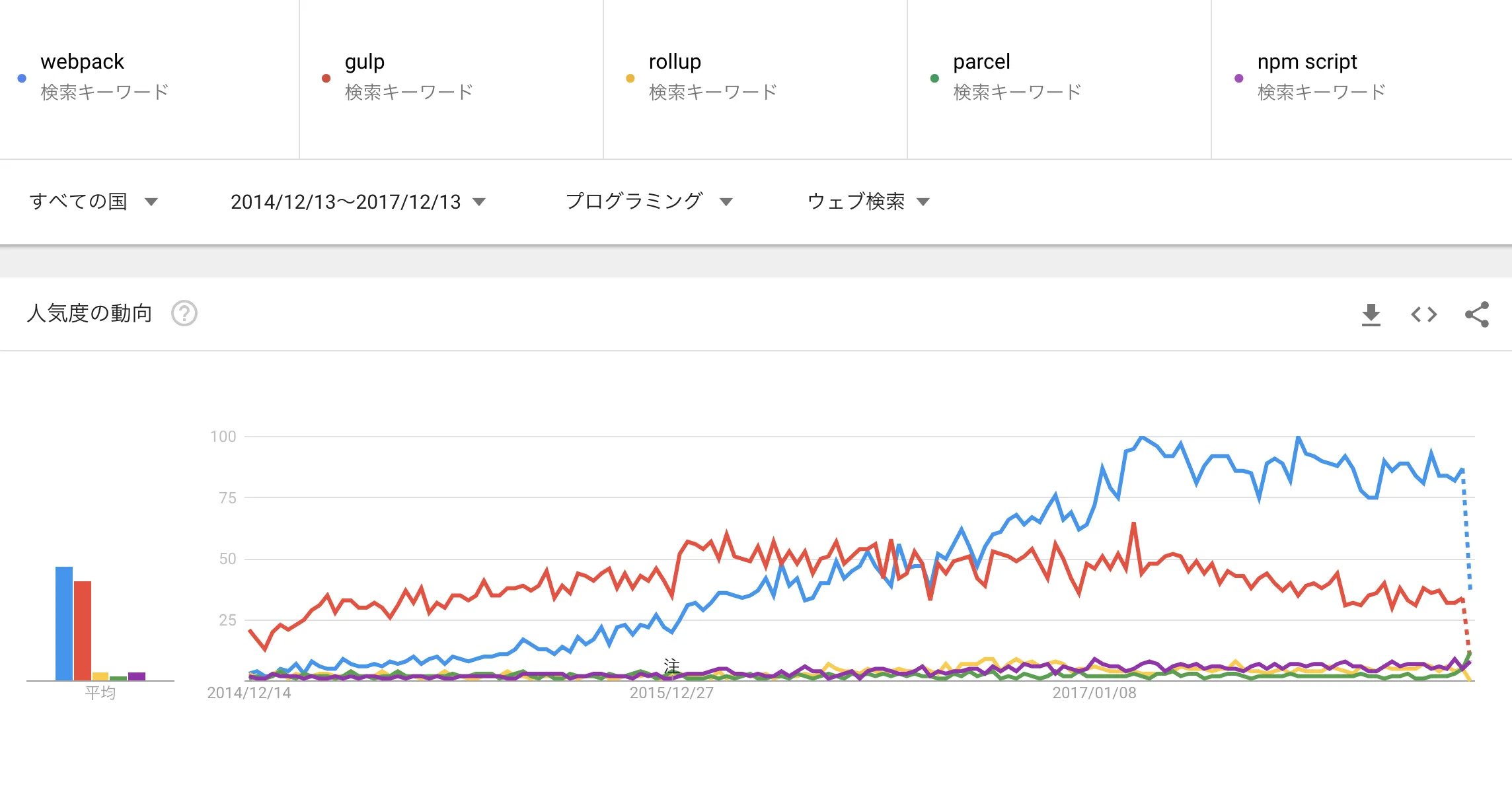
Google Trend
A trend of search counts on Google Trends. I excluded fuse-box because it was clearly off the chart with very few searches. Note that for npm script, since many people search “npm run,” the actual count is likely a bit higher.
Guidelines for choosing
If preparing or learning all these is a hassle, use Create React App or Web Starter Kit. Pick Create React App if you want to use React, or Web Starter Kit if you want a rich environment for web development.
If you want to define your own tasks, you’ll be configuring and using a task runner. As a premise, gulp and npm script lean strongly toward being general-purpose task runners, while webpack, rollup, and parcel lean strongly toward being module bundlers.
Basically, if you just want to use the bare minimum of SCSS, Babel, etc., npm script alone should be sufficient.
If you want to mass-produce pages with EJS or PUG, or create slightly unusual build tasks, Gulp’s rich API and plugins may come in handy.
When doing serious SPA development with React or similar, you’ll have a hard time without a module bundler like webpack. Furthermore, if you want to create a publicly distributed library, rollup may be a good fit. For hobby development, trying parcel with hopes for the future is a viable option.
Treating webpack as the JS bundler and gulp as the SCSS / image-compression tool and using both is also one option.
There’s also a very recommended approach: define tasks with Gulp or Webpack, but execute commands via $ npm run or $ npx defined in package.json. To run gulp or webpack commands directly in the terminal, you need to install them globally (install them PC-wide so they’re usable from any folder). But if you install only into the project folder and run via npm script, it’s done with just a local install (installed only inside the project folder, usable only there). The advantages of this include:
- You can specify versions per project
- Even with multiple users, versions can be unified
- Users only need to use npm commands
This article has examples toward the end. Personally, I do this often—using npm script to build SCSS and the like, and using Webpack to bundle JS.
Finally
I sincerely hope this pointless war ends quickly and peace arrives.