
As a prerequisite, this isn’t really necessary if you’re already using a password manager like LastPass or 1Password. That said, the technique can be used alongside one, so it should still be useful as a reference.
Security Risks Around Passwords
First, let’s quickly review what kinds of risks passwords for web services and apps face. Feel free to skip this section.
Credential Stuffing (List Attacks)
The risk arises when an “account information leak” occurs. Attackers take a set of “account IDs and passwords” leaked from one site and try them on other sites. People who reuse the same ID/password combinations across multiple sites are the most at risk.
To avoid this, you need to use different passwords for every service and app.
Brute-Force Attacks
If you try every possible character combination, sooner or later your password will be cracked. Of course this isn’t realistic for a human to do one by one, but with automated computer programs, simple passwords can be broken in a remarkably short time.
For example, a 4-character password using only English letters can be cracked in about 3 seconds—instantly. By contrast, an 8-character password using uppercase and lowercase English letters, numbers, and symbols would take about 1,000 years to crack. (Reference)
In other words, you need to make your password complex by combining uppercase and lowercase English letters, numbers, and symbols.
Dictionary Attacks
Many people use simple passwords like password, 12345678, or qwerty. These are well known to attackers and are easy to try in login attempts. Common dictionary words like banana or love are also frequently tried in brute-force attempts. To avoid this, you need to avoid using commonly used passwords or simple words.
Account Hacking via Password Guessing
If you use your birthday or favorite words for your password, family members or friends might guess it, or an attacker who has researched your personal information might figure it out. If it’s just an acquaintance, a small prank might be the worst of it, but there’s also a risk of, say, a child using a credit card to make expensive purchases.
To avoid this, you need to avoid using easily guessed information like your birthday.
That’s a quick rundown of the security risks that come with passwords. If you’d like to learn more, the following book is a good reference.

Hiroshi Tokumaru's Web Security Classroom (Nikkei BP Next ICT Selection) | Hiroshi Tokumaru | Engineering | Kindle Store | Amazon
 amazon.co.jp
So, to sum it up roughly, you need to use strong, unique passwords for every service—but in practice that’s not so easy to think through every time, and remembering all of them is unrealistic.
A Safe and Easy-to-Remember Password Method
Here’s the main idea. The method is to use the name of the service you’re signing up for, and convert it into a password using your own personal rules. For a Google account you’d base it on google; for an Instagram account you’d base it on instagram. Of course using the name as-is would be a weak password, so you create a strong password by applying your own conversion rules to the word.
An Example of Personal Rules
For example, you could use rules like the following. * Of course, don’t use this verbatim—you’ll need to come up with your own rules.
- Prepare a combination of 4 random digits and symbols. (Memorize this part with effort.)
- Take the first 4 letters of the service name and alternate uppercase and lowercase.
- Combine 1 and 2 by interleaving them, and you’re done.
It might sound complicated, but it’s actually easy once you try it.
A Real Example of Building a Password
Let’s say you’re registering an account on a service called U-NEXT and need to come up with a password. In this case, you’d base your password on the string unext.
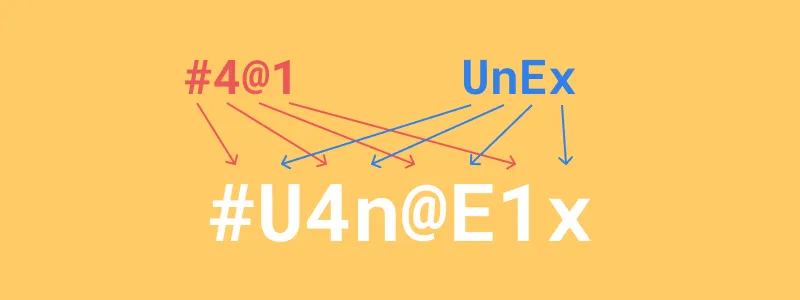
1. Prepare a combination of 4 random digits and symbols
First, prepare a 4-character keyword that randomly combines digits and symbols. Since you’ll reuse this part, do your best to memorize it.

2. Take the first 4 letters of the service name and alternate uppercase and lowercase
Take the first 4 characters of the service name. Alternate them in uppercase and lowercase. If the service name is short, just repeat it. (e.g., alu → alua)
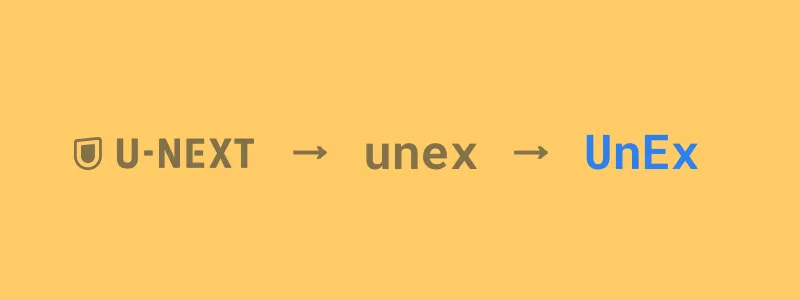
3. Combine 1 and 2 by interleaving them, and you’re done
Just combine the two strings, and you’re done.
Other Examples of Personal Rules
The more complex your personal rule is, the stronger and harder to crack the password becomes. Here are some other conversion rule ideas to consider when designing your own.
- Instead of using the service name as-is, shift each letter of the alphabet by one
- U-NEXT → unex → UnEx →
VoFy
- U-NEXT → unex → UnEx →
- Build an 8-character string from the service name, and replace the even-numbered positions with characters from your keyword
- U-NEXT → unextune + #4@1 → u#e4t@n1e
Note that the allowed characters, symbols, and password lengths vary by service, so a rule that adapts to those constraints would be ideal.
What if You’re Worried About Forgetting Your Rules?
If you’re worried about forgetting your rule or keyword, writing them on paper and storing them somewhere safe is fine too. It might sound risky, but security expert Tokumaru-sensei has also said that writing them on paper itself is safe. Of course, writing them on a sticky note and posting it where anyone can see is out of the question…
Summary
The advantages of this approach are:
- You can build strong passwords combining letters, numbers, and symbols, so it’s resistant to dictionary and brute-force attacks
- You can use a different password for each service, making it resistant to list attacks
- All you need to remember is a 4-character phrase and your personal rule, so it’s easy and convenient
Thanks for reading. I’m not a security expert, so if anyone more knowledgeable has feedback, comments would be much appreciated.